
Every dealer in its own city, one brand voice
Meta ads, social content, TikTok and WhatsApp marketing, plus your Google data, all in DealerBot. HQ sets the rules and templates and your brand can approve content in the client portal; dealers launch local campaigns in minutes, and you see the results dealer by dealer.
130+ dealer accounts in Türkiye run on this panel
Why is dealer-network marketing so scattered?
Scattered tools, approvals lost in email threads, quality that changes from dealer to dealer. On the other side: the same work, done in DealerBot.
Without DealerBot
- Every dealer uses their own tools, their own way
- Campaigns are built one by one, by hand
- Logo, language and quality drift from dealer to dealer
- Who spent what and what it earned: nobody can see it clearly
- Approvals get lost in email threads
- Content creation is every dealer's own problem
With DealerBot
- The whole network in one list, on one standard
- Campaign from an approved template: minutes
- Brand rules from HQ, on every piece of content
- Spend and results per dealer, with Google data, in one report
- Digital approval flow: one click, full trail; brand sign-off in the client portal
- The AI assistant drafts copy and visuals in a minute
What HQ does, what the dealer does
Rules are written at HQ, the work happens at the dealer. Reports land on both desks at the same time.
Headquarters & Brand
- Set strategy, brand rules and budget limits
- Create approved campaign templates for every dealer
- Watch the whole network's performance, Google data included, in the reports
Dealer
- Launch local Meta campaigns with approved templates
- Plan and publish social media content
- See local results, submit for approval
Everything a dealer needs for marketing
Campaign, content, approval and reporting modules. Use the tabs to filter.
Centralized Campaign Management
Create and manage all your dealers' Meta (Facebook and Instagram) ads in DealerBot, with city or region targeting. When boosting a post, enter the budget by hand, choose a daily or lifetime budget and apply a saved audience. Ad text runs up to 2,200 characters, and link ads support a headline.
Content Planning
Plan your social media content on a calendar. Create professional content with a media library, text editor, and A/B test variations.
Approval Workflow
Headquarters sets brand guidelines, dealers execute. Campaigns and content go through an approval process to ensure brand consistency.
Content Calendar
Plan, schedule, and auto-publish your social media posts on a visual calendar. When you delete a post, you can choose to remove it from Facebook or Instagram too (stories excluded).
AI Content Generation
Automatically generate social media copy, ad headlines, and visual designs with AI-powered assistants.
Brand Identity Analysis
Analyze your website with AI, define your brand identity, and ensure consistency across all content.
Media Library
Centrally manage, organize, and share all your visual assets with dealers.
Video Ads
Add video to your ads, pick the cover frame, and publish to Facebook and Instagram.
Statistics and Alerts
Follow impressions, clicks, CTR, spend and conversions with charts by location and dealer; data refreshes several times a day. If a dealer's Meta ad account is not active (unpaid balance or a closed account), the warning shows in both the dealer and the HQ view.
Automated Reports
Monthly social and performance reports are built and delivered to your inbox. Dealers and HQ get the same performance presentation (PowerPoint), including a competitor analysis slide when competitors are tracked and a GA4 web traffic slide when Google is connected. The ad status sheet can arrive weekly too.
A few screens from inside the panel
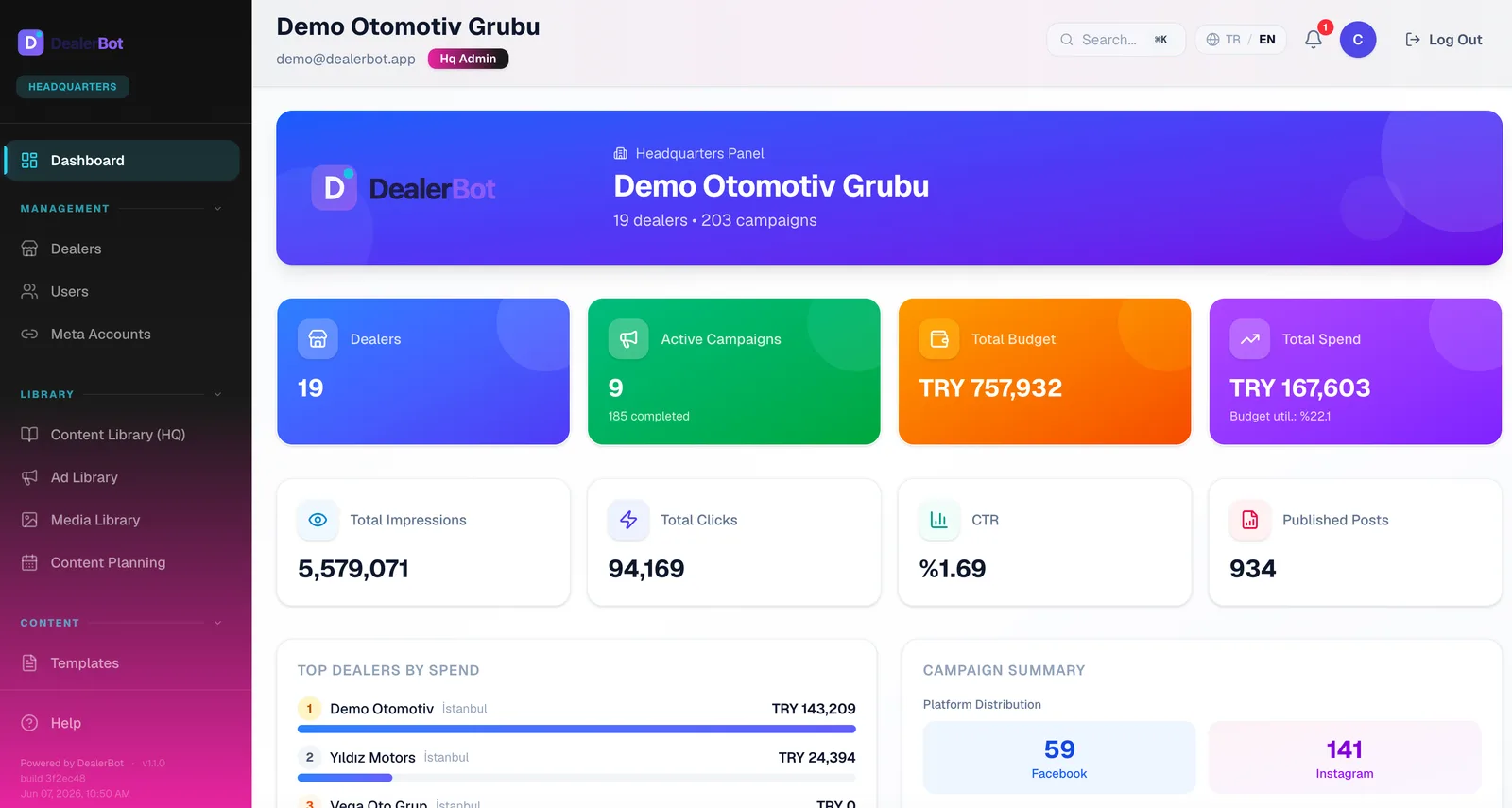
The dealer dashboard, the campaign list, the Dee assistant and dark mode, all in the new-generation interface. Switch tabs to browse.

DealerBot in numbers
What our dealers have done on this panel so far.
Figures are live platform measurements; rounded lower bounds (October 2026).
Meta Tech Provider
WhatsApp Business Tech Provider
KVKK Compliant
Our data processing terms are in our privacy policySSL Encrypted
Encrypted connection with SSL
Frequently Asked Questions
Short answers to the questions we hear most
What is DealerBot and who can use it?
DealerBot is a social media and ad management platform for dealer networks: Meta (Facebook and Instagram) publishing and ads, TikTok, WhatsApp marketing, Google data (GA4, YouTube, Google Ads), reporting and AI content tools. There is also an iOS and Android app. It can be used at any scale, from a single dealership to groups with 100+ dealers.
How long does the setup process take?
Setup is done together with our team: your accounts are connected and dealers and users are set up. The duration depends on your number of dealers and accounts to connect; we draw up a clear plan during the demo call.
Which marketing platforms do you support?
We support content publishing, ad management and analytics across Meta (Facebook + Instagram), plus TikTok publishing with core performance metrics. On the Google side, GA4 web traffic, YouTube channel stats and Google Ads results are shown read-only (Gold tier and above). Bulk WhatsApp campaigns are also managed from the platform; LinkedIn and Google Business Profile support is coming soon.
Is our data secure?
Data is transmitted over an SSL-encrypted connection and stored on Supabase infrastructure. Access tokens of connected accounts are stored encrypted, and with role-based access control only authorized people can reach the data. The Google connection is read-only; GA4 and YouTube data is not stored in DealerBot but read on demand. Details are on our Privacy Policy and Data Deletion pages.
How can I get started?
Request a demo; we'll plan the process together and set up according to your needs. Just fill out the free demo form.
Can it integrate with our existing CRM system?
DealerBot's key-based REST API lets you pull ad spend and social media metrics into your own systems, and send WhatsApp template messages, bulk sends and manage contacts from your own application. We do not offer ready-made CRM or DMS connectors; we define the integration scope together during the demo call.
How does AI content generation work?
Our AI assistants generate social media copy, ad headlines, SEO-optimized content, and visual designs. You get automatic content suggestions tailored to your brand identity.
What roles and permission levels are available?
There are 5 roles: headquarters admin, headquarters manager, dealer admin, dealer staff, and viewer. In addition, the brand (client) role sees only the brands assigned to it; it previews and approves content, requests changes or leaves comments, and does not create posts or campaigns. The client portal is enabled for your organization during setup. Each role has customized access rights.
What reporting and analytics features are available?
Alongside campaign performance, spend analysis, dealer comparisons and trend reports, it offers a monthly social media report (web and PDF), a performance deck (PowerPoint) and scheduled email reports. When Google is connected, a GA4 web traffic section is added to the reports.
Is there a free trial?
Yes. The Trial package lasts 14 days and covers all platform modules (LinkedIn coming soon). To get started, fill out the demo request form; our team replies within 24 hours and helps with setup.
What packages are available and how do they differ?
We offer five packages: Trial, Silver, Gold, Platinum and Diamond. Trial covers all modules for 14 days. Silver includes Facebook-Instagram publishing and planning, Meta ad management, reports and the content library. Gold adds TikTok, competitor analysis and sub-dealer hierarchy; Platinum adds WhatsApp marketing and AI tools, and Diamond adds weekly automated AI insights. See the full comparison on our Packages page.
How much do the packages cost?
Pricing is tailored to your dealer count, the modules you need, and your usage volume. Reach out via "Request a Quote" on the Packages page and our team will prepare a custom offer within 24 hours.
What does the Google integration cover?
It connects with a single Google account and works read-only: GA4 web traffic, YouTube channel stats and recent videos, and Google Ads campaign results appear in the panel and in reports. Client accounts under agency manager (MCC) accounts can be selected too. DealerBot never publishes or changes anything in your Google account. Google Business Profile support is coming soon.
How does brand or client approval work?
Agencies and headquarters send the posts they prepare to the brand for approval through the client portal. The brand previews the content, compares it with the previous round, approves it, requests changes or leaves a comment with an image. When approval is made mandatory for a dealer, nothing can be published before it, and if the content changes after approval it needs approval again. Approval requests, decisions and comments are delivered as web and mobile notifications. The client portal is enabled for your organization during setup; we show the details in the demo call.
Is there a mobile app?
Yes, there is an iOS and Android app, available on the App Store and Google Play. Dealers get the overview, Facebook and Instagram reports, campaign creation and budget management, post creation, the content calendar, approvals and notifications. Headquarters sees network analytics, the dealer list and reports, and brand users see approvals and reports.
Which accounts have the new interface?
The new-generation interface is rolling out gradually and is not on for every account yet. The theme derived from your organization's color, logo and font, and the dark theme, are part of it. The current interface keeps working during the transition; we agree on when your account moves in the demo call.
What does the Meta ad account warning mean?
The warning shows that the ad account assigned to a dealer is not active on Meta: there may be an unpaid balance, or the account may be closed or disabled. The dealer settles the balance under Billing in Meta Ads Manager; Meta may stop the ads until payment is received. A closed account can't run ads, so the dealer needs a working ad account assigned. The warning appears in the dealer panel and in the HQ view, and the status refreshes on every Meta sync.
How often is data synced?
Meta data syncs several times a day and Google Ads results once a day. GA4 and YouTube data is not stored in DealerBot; it is read from Google when you open the screen or report. Monthly reports are built at the start of the month. Platforms have their own delays, so numbers in the panel can differ by a few hours from the platform's own console. Consistency between the panel and the platforms is also checked automatically every day (internal monitoring).
See it with your own network
Walk through the platform with your own dealer scenarios in a live demo. Bring your questions; no sales pressure.
- Live demo
- Needs analysis
- No binding commitment